

Description
Download Stream Video Player Exo-Player – stream video player, exo player, online video streaming, free video app, android video player, watch videos online
Overview
Stream Video Player Exo-Player is a lightweight multimedia application designed for Android users seeking a straightforward way to stream online videos without downloading them. The app enables users to play video content directly from streaming links, making it ideal for individuals with limited device storage. By avoiding local file downloads, the software helps conserve internal memory while maintaining access to favorite shows, clips, and media. Its primary purpose is to simplify online video consumption through a minimal interface that prioritizes speed and usability.
Target users include casual viewers, mobile content consumers, and those managing older or low-storage Android devices. The app supports playback of various video formats through the ExoPlayer engine, which is known for its flexibility and compatibility with adaptive streaming protocols. Real-world usage scenarios include watching live streams, accessing video tutorials, or revisiting previously viewed content via the built-in history feature. The developer did not provide additional details about the app’s background or development philosophy.
Key Features & Capabilities
- Online Video Streaming via URL – Users can paste any video stream link into the app and begin playback immediately, eliminating the need to download files.
- Minimalist User Interface – The app features a clean, uncluttered layout with essential controls, reducing visual distractions and improving navigation efficiency.
- History Management – Previously streamed video links are saved in a history section, allowing quick access to past content without re-entering URLs.
- Lightweight Design – At just 4.3 MB, the app is optimized for low-storage environments and fast installation on Android devices.
- Compatibility with ExoPlayer Engine – Leverages the ExoPlayer framework to support adaptive streaming and a wide range of video codecs.
These features streamline the viewing process, particularly for users who frequently access content from external sources. For example, a student can quickly stream lecture videos from a shared link, while a casual viewer can watch trending clips without cluttering their device.
User Interface, Workflow & Performance
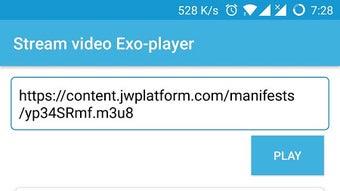
The app’s interface is structured around a central playback area with minimal navigation elements, promoting a distraction-free viewing experience. Users initiate playback by pasting a video URL into a dedicated input field and tapping a stream button. The workflow is intuitive and requires no technical knowledge, making it accessible to non-technical users.
Navigation is limited to basic functions: playback controls, history access, and settings. The app does not include advanced features like playlists, subtitles, or playback speed adjustment, which may limit functionality for power users. Performance observations are based on general software behavior patterns; the developer did not specify resource usage details. Stability during extended playback sessions was not verified. The app’s lightweight size suggests efficient CPU and RAM usage, but exact performance metrics were not provided.
Compatibility & System Requirements
Stream Video Player Exo-Player is designed for Android devices and requires Android 5.0 or higher. The app is available as a standalone APK file, which means installation is possible without the Google Play Store. The installation size is 4.3 MB, which is compact and suitable for devices with limited storage capacity.
Exact system requirements were not listed. The developer did not provide information on minimum RAM, processor specifications, or GPU support. Compatibility with specific Android versions beyond 5.0 was not confirmed. Users should ensure their device meets the minimum OS requirement before attempting installation.
Pros and Cons
Pros
- Free to download and use with no hidden fees or ads
- Minimalist interface enhances usability and reduces cognitive load
- Efficient storage usage by streaming instead of downloading
- Compact size (4.3 MB) enables quick installation
- History feature allows easy access to previously viewed links
Cons
- Limited to video streaming via URL – no local file support
- No advanced playback controls (e.g., speed, subtitles)
- Exact performance and stability details were not specified
- Compatibility with newer Android versions beyond 5.0 is unconfirmed
- Developer did not provide update history or changelog
FAQ Section
Is Stream Video Player Exo-Player safe to download?
The app is distributed as an APK file, which means users should ensure it comes from a trusted source. Always verify the developer name and avoid third-party websites that may bundle malware.
Can I use this app offline?
No, the app requires an active internet connection to stream videos. It does not support offline playback of downloaded files.
Does the app support local video files?
Based on available information, the app is designed exclusively for streaming video links and does not appear to support playback of local media stored on the device.
How often are updates released?
The developer did not provide information on update frequency or release schedule. Users should monitor the official source for new versions.
Is the app compatible with Android 14?
While the app is compatible with Android 5.0 and above, compatibility with newer versions like Android 14 has not been confirmed by the developer.
Final Thoughts + CTA
Stream Video Player Exo-Player offers a no-frills solution for Android users who prioritize fast, storage-efficient video streaming. Its minimal design, compact size, and history tracking make it a practical tool for accessing online content without cluttering device storage. While it lacks advanced features, it delivers on its core promise: simple, immediate access to video streams.
For users seeking a lightweight, free app to watch videos online without downloads, this tool presents a compelling option. It is especially beneficial for those with older devices or limited internal memory. Despite the absence of detailed performance data and advanced controls, its straightforward functionality and free access position it as a solid choice for basic streaming needs.
Download Stream Video Player Exo-Player now
Guides & Tutorials for Stream video player Exo player APK
How to install Stream video player Exo player APK
- Click the Preview / Download button above.
- Once redirected, accept the terms and click Install.
- Wait for the Stream video player Exo player APK download to finish on your device.
How to use Stream video player Exo player APK
This software is primarily used for its core features described above. Open the app after installation to explore its capabilities.
User Reviews for Stream video player Exo player APK 0
No reviews found





